CONFIGURAR NETSCAPE MAIL SI YA TENIAS OTRO E-MAIL
Paso 1: Ir a "Inicio" - "Programas" - "Netscape Comunicator" - "Utilities" - "User Profile Manager".

Paso 2: Te aparecera la siguiente ventana hace clic en "New"

Paso 3: Luego hace clic en "Siguiente"

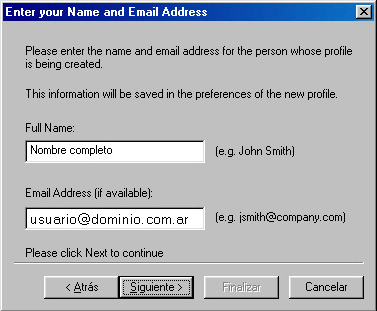
Paso 4: Ingres� en el recuadro "Full Name" tu nombre completo, en "Email Address" es tu direcci�n de email de www.com.ar ([email protected] o .net.ar) y luego hace clic en el bot�n "Siguiente".
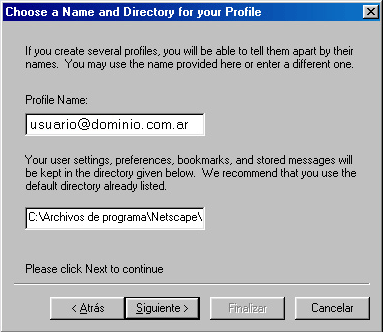
Paso 5: En esta ventanda hace clic sobre el bot�n "Siguiente".
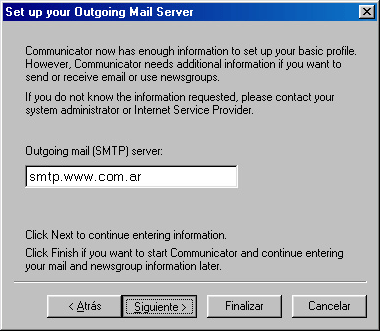
Paso 6: Complet� "Outgoing mail (SMTP) server" con "smtp.www.com.ar" y hace clic sobre el bot�n "Siguiente".
Paso 7: Complet� "Mail server user name" que es tu direcci�n de email de www.com.ar ([email protected] o .net.ar), en "Incoming Mail Server" pon� otra vez "igratis.www.com.ar", selecion� "POP3" en "Mail Server type" y hace clic sobre el bot�n "Siguiente".

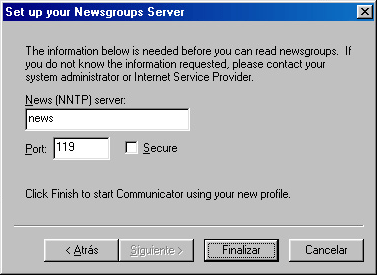
Paso 8: En esta ventana no ingreses ning�n dato y hac� clic en el bot�n "Finalizar" y listo.